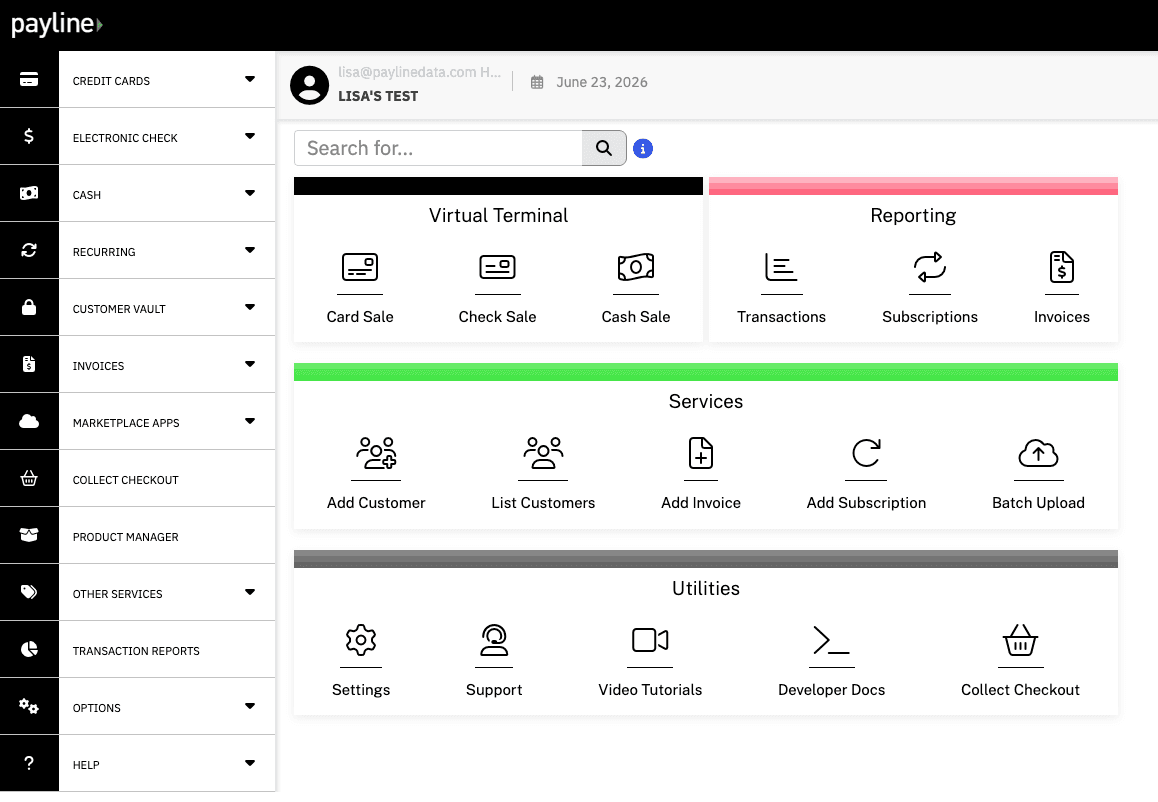

Phone orders.
Enter an authorized payment while following your business’s approved process.
A payment gateway connects a checkout or other payment interface with processing services to request payment authorization. It helps move transaction information through the payment flow and returns the response to the interface.
Your gateway is one part of the setup. You also need an approved processing relationship and compatible tools for the way you accept payments.
Simplified authorization flow. Authorization and the later settlement and funding process are different stages.
The customer or authorized staff member starts the payment.
Transaction information moves through the processing services.
The interface receives the result of the authorization request.
Available features depend on the gateway, processing provider and configuration. Not every tool is included in every solution.
Enter an authorized payment while following your business’s approved process.

Handle supported deposits or balances when the customer is not at a physical checkout.

Review the transaction, reporting and account-access features actually included in your selected solution.

Recurring billing, stored-payment tools and ACH availability depend on the product and account. Confirm these features rather than assuming every virtual terminal includes them.

The gateway connects payment interfaces to processing services. The virtual terminal is the browser interface your staff use to enter authorized payments.
Your team signs into the payment interface and enters the information required for the transaction. The payment system returns a response, and the transaction follows your account’s processing and funding arrangements.
Use the provider’s required procedures for authorization and handling payment details. Never collect sensitive card information through an unapproved channel.

With a virtual terminal, your team enters the payment. With a payment link, the customer visits a supported payment page and enters their own information. Choose the approach that fits the transaction and your operating requirements.
Explore payment links · Explore online payments · Explore recurring billing.

Confirm fees and funding arrangements for your approved account.

Confirm the access and configuration required before relying on a launch date.

Confirm the reporting and account-access features available for your selected solution.

Confirm who handles account questions and technical issues for your setup.

The gateway supplies payment technology; the merchant processing relationship establishes the approved arrangement for processing and funding. Choosing them together helps you avoid compatibility problems between your checkout, provider and business requirements.
Understand merchant accounts · Explore credit card processing
An online store, a service business collecting a deposit and a software platform may need different payment flows. Start with the customer experience, then map the payment methods, recurring needs, reporting and integrations required to support it.
Ask how your chosen solution transmits and stores payment information, which access controls are available and what PCI responsibilities remain with your business.
Some solutions use tokenization to replace sensitive payment information with a reference value in supported workflows. Availability and implementation vary; confirm the features of your specific setup rather than assuming every gateway works the same way.
Review the supported gateway and processor combinations, available documentation, testing process and ongoing operational responsibilities before building. Payline Connect is the starting point for discussing a software payment integration.
“It is user-friendly. Payline deposits in our bank account is an advantage. The additional security codes provide a layer of protection.”
Rebeca C.“Payline helps our accounting team balance financial reports by managing financial transactions such as payments and refunds. Essentially, it's a straightforward method to manage all of our purchases and sales within a single app.”
Arindam B.“Their quick service and easy to get a hold of. They also have their own gateway with an API to access it.”
Stan T.“Payline makes transactions such as payments, refunds, and helps our accounting team reconcile financial reports. Basically, it is an easy way to track our purchases and sales in one app.”
Verified User“The structure of Payline is very easy to use.”
Verified User“Buffy, out account representative. She is just AMAZING. Always gets back to us on time and is very helpful! I will not go back to any other merchant service provider. Customer service and clarity is what every business needs and looks for. With Payline you are guaranteed to have all that, We are very happy with Payline.”
Verified User“Our rep. Buffy is the best. She is always quick to respond and help with any situations that we have. We also like the next day deposit availability.”
Verified User“Easy credit card processing system that allows a fast pace work environment with no delay.”
Verified UserIt is a browser-based tool for entering and managing supported payments. Businesses commonly use it for authorized phone or other remote transactions.
They are different parts of the payment setup. The virtual terminal is the interface your team uses; gateway technology connects payment interfaces to processing services.
Manually entered virtual-terminal transactions do not require a physical reader. Any optional reader or other hardware must be compatible with the selected product.
Some solutions include or connect with recurring-payment tools. Confirm availability, authorization requirements and billing controls for your setup.
A virtual terminal is generally a staff-facing interface. Use an appropriate hosted checkout or payment-link experience when customers need to enter their own payment information.
Timing depends on account approval, access and configuration. Confirm your setup requirements before relying on a launch date.
It connects a checkout or payment interface to processing services for authorization and returns the transaction response. It does not replace the merchant’s processing relationship.
Online payment services generally include gateway or equivalent connection technology. It may be bundled into your chosen platform rather than sold as a separate product.
No. They perform different roles in the payment flow, although one provider may offer both services together.
Some gateway solutions support recurring-payment tools or integrations. Confirm scheduling, stored-payment and account requirements for the actual offering.
A virtual terminal is useful for staff-entered payments. It commonly uses gateway services behind the scenes and does not provide the same customer experience as a website checkout.
Payline’s integration offerings include API-based approaches. The available endpoints, supported providers and access requirements depend on the solution; review the appropriate documentation with the team before designing your integration.