How to Manage and Track Quotas in Salesforce
Introduction: Why Managing Quotas Matters
Sales quotas are essential for any sales team. They set clear targets, motivate sales reps, and allow managers to measure performance. When sales teams know exactly what they need to achieve, they can focus their efforts and drive results. Quotas also help businesses forecast revenue and plan for growth.
Insight:
Imagine a software company that sets a monthly sales quota of $50,000 per sales rep. Each rep knows that closing deals totaling $50,000 by the end of the month is required to meet their target. If one rep closes only $30,000 in deals, managers can identify the gap early, provide coaching, or adjust strategies to help the rep catch up. On the other hand, reps who exceed their quota can be recognized or rewarded, motivating the entire team.
However, managing and tracking quotas can be difficult. Many teams rely on spreadsheets or manual tracking, which is time-consuming and prone to errors. As sales teams grow, quotas can become more complex. Managers may struggle to see real-time progress, track multiple quota types, or generate consistent reports. Salesforce quota attainment helps solve this by automatically calculating how much of each quota has been achieved, giving managers and reps clear, real-time visibility into performance.
Recent research shows that 69% of sales leaders use Salesforce to set and monitor quotas, and 59% track their sales pipelines to see how quotas are performing. At the same time, 87% of sales leaders do not have a clear method for setting quota targets. This shows that even with tools like Salesforce, managing quotas well still needs clear processes and planning.
In this article, we will look at how to manage quotas in Salesforce, the common challenges you may encounter, and the best practices to ensure accurate quota management.
Key Challenges in Managing Sales Quotas
Sales quotas are essential for guiding sales teams and measuring performance, but tracking them effectively can be difficult. Before we look at how to build quota management in Salesforce, let’s take a closer look at the common challenges that can arise and make quota management time-consuming, error-prone, or unclear.
1. Manual Processes and Lack of Automation
Many teams still rely on spreadsheets or simple tables to track quotas. This approach is slow, prone to mistakes, and requires frequent updates to keep data accurate.
2. Limited Real-Time Visibility
Without real-time data, managers may not know how their team is performing until the end of a month or quarter. This lack of visibility into quota attainment at Salesforce makes it difficult to identify issues early, provide timely coaching, or adjust strategies.
3. Complex Quota Structures
Quotas often vary by product, region, role, or team. Tracking all these variations manually can be confusing, and important data can get lost or miscalculated.
4. Inconsistent or Inaccurate Reporting
Relying on multiple tools or spreadsheets can lead to inconsistent reports. Managers may struggle to get a clear view of performance and progress, making it difficult to interpret the quota attainment report in Salesforce or make informed decisions.
Understanding these challenges is the first step in improving quota management. In the next section, we’ll explore how to prepare for setting up quotas, tracking, and managing them more effectively.
Preparing for Quota Management in Salesforce
Before setting up Salesforce quotas, it’s important to take a structured approach. Here are some strategies to make quota management more effective:
- Explore Available Options: Take time to understand the tools Salesforce offers for managing quotas. Review Salesforce quota tracking features like Forecasts, custom objects, or other internal tracking methods. Evaluate which option aligns best with your team’s structure, reporting needs, and business goals.
- Set Clear and Achievable Targets: Quotas should be realistic yet motivating. According to the Salesforce State of Sales, 67% of sales reps don’t expect to meet their quota in 2024, and 84% missed it in 2023. You can use historical sales data and performance trends to set targets that push your team without causing frustration. Clear targets help reps focus and managers measure progress accurately.
- Maintain Transparency: When sales reps cannot easily access their own progress, it is hard for them to understand how their performance contributes to team goals. A lack of visibility into a Salesforce quota attainment report can reduce accountability and make it more difficult to motivate teams to reach their quotas.
- Review and Adjust Regularly: Quotas should evolve with your business. Regularly monitor performance and adjust targets as needed to reflect market changes, product launches, or shifts in team capacity. Salesforce makes it easy to update quotas quickly and keep goals relevant.
How to Manage Sales Quotas in Salesforce
There is no single way to manage sales quotas Salesforce. Each company sets them up based on how they track performance, motivate teams, and plan compensation. Salesforce gives you several options to do this, from built-in tools to advanced apps and custom solutions. The three most common ways are using Forecasts Quotas, Salesforce Spiff, or building your own quota management system.
Forecast Quotas
The easiest way to manage Salesforce sales quotas is through the Forecasts Quotas. It’s built into most Salesforce editions and allows you to assign, track, and review targets directly in the system.
To get started, go to Setup → Forecasts Settings and make sure the Turn on Forecasting is turned on.

Forecasts Settings
Then open Forecasts Quotas from Setup to enter targets for each user. You can assign quotas by Opportunity Amount or Revenue and define the time period.

Forecasts Quotas
Once quotas are set up in Salesforce Forecasts, managers and reps can compare them with actual opportunity amounts in real time. The Forecasts tab displays each user’s attainment toward their quota, and results roll up through the forecast hierarchy to show both team and individual performance.
This method is best for companies that use straightforward revenue targets and want a native Salesforce setup. For more complex quota types, such as quotas by product mix or activity level, you may need Salesforce Spiff or a custom-built solution.
Salesforce Spiff
For companies that link sales targets directly to compensation, Salesforce Spiff (Incentive Compensation Management) offers an advanced way to manage quotas. It allows managers to design detailed quota structures, assign targets, and connect those targets to commission or bonus plans.

Quota Table, image from Trailhead
Admins can create quota tables and set time periods. As opportunities close in Salesforce, Spiff automatically updates progress and displays results in clear dashboards. This gives both managers and reps real-time visibility into performance and payout expectations.
Spiff is especially useful for organizations with complex incentive plans or layered quota rules. It helps align sales goals with compensation, motivates teams, and reduces manual work, though it requires setup and licensing to get started.
Custom Build
Some companies need more flexibility than Salesforce’s standard tools provide. In this case, they can build a custom Salesforce quota management using custom objects (like Quota and Quota Performance), Flows, and dashboards.
This approach allows tracking any metric: revenue, new clients, renewals, or upsells, and defining how each contributes to the total target. However, building and maintaining such a solution requires time, cost, and a professional Salesforce team, making it suitable for organizations with advanced technical resources.
AppExchange Tools
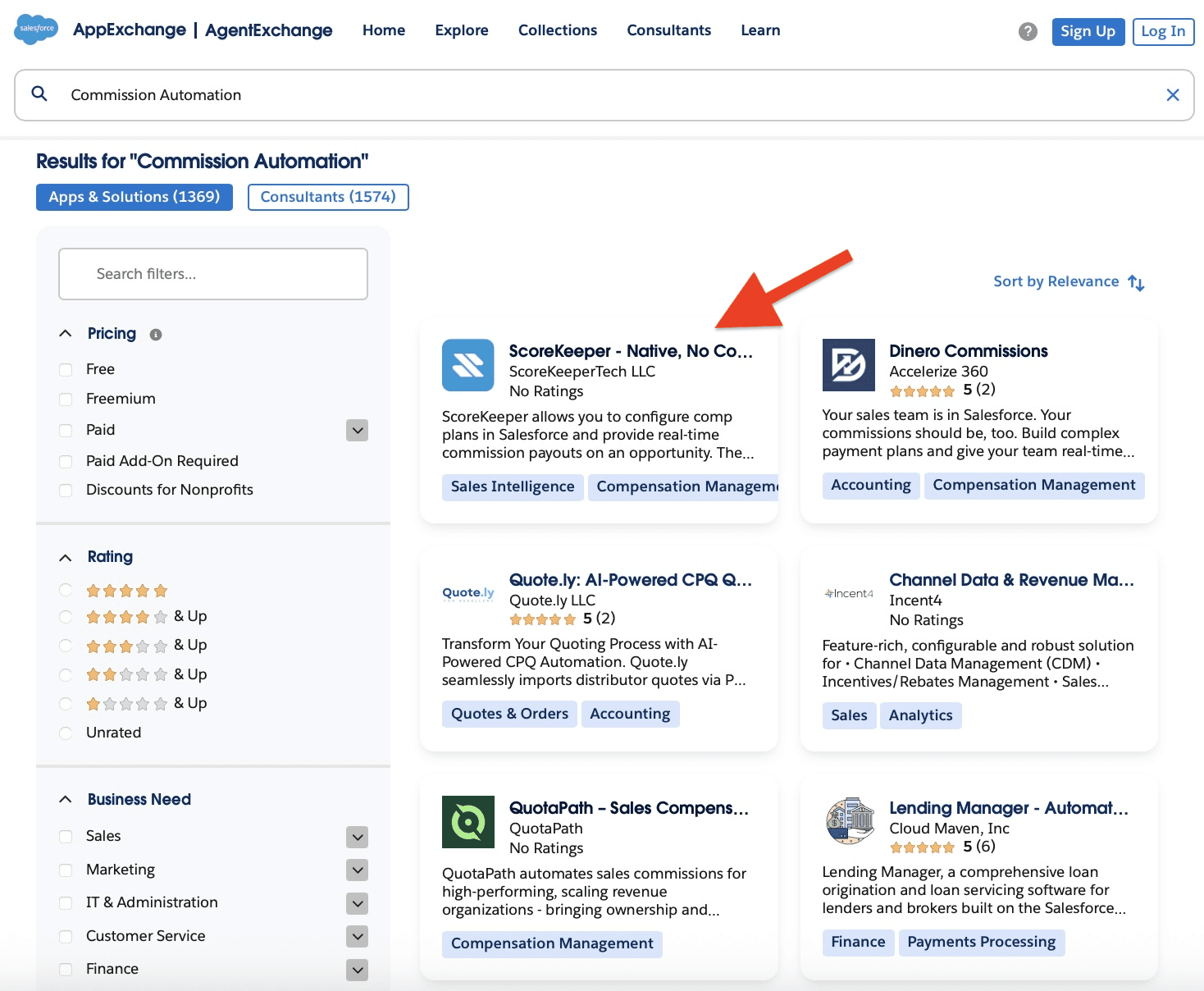
To explore faster ways to manage quotas, we looked at solutions on the Salesforce AppExchange and found ScoreKeeper. It is a native, no‑code tool, making it easy to set up and use without development skills.

Solutions on AppExchange
ScoreKeeper can help not only with quota management but also with commission automation. It provides visual dashboards, real-time updates, and automated goal tracking across teams. Managers can assign quotas, monitor progress, and calculate payouts without relying on spreadsheets or custom coding.
Using this prebuilt tool allows companies to implement a comprehensive sales performance system quickly. It reduces manual work, ensures accurate tracking, and provides insights for coaching and performance planning. Like other apps, it does have costs, but it can save time and simplify quota and commission management for teams of any size.

ScoreKeeper on AppExchange
How Tools Can Help You
Apps available on Salesforce AppExchange, like ScoreKeeper, provide prebuilt solutions for managing sales quota Salesforce and tracking performance. These tools bring automated logic into Salesforce, reducing the need for spreadsheets and manual calculations.
With such tools, companies can:
1. Define and assign quota targets without coding
Managers can set quotas for users directly in Salesforce, without creating custom fields, formulas, or flows. Targets can be entered manually and adjusted at any time.

Create Quota Target
2. Real‑time data and a single source of truth
Native apps, like ScoreKeeper, operate entirely within the Salesforce platform, so your data stays inside one system and there’s no need to sync with external servers. This reduces delays, errors, and duplication of data.

Example of Bonus Payout Quota Target in ScoreKeeper
3. Track progress automatically
Quota attainment can be monitored directly within Salesforce, for example, on Opportunity records. As opportunities are updated, progress toward quotas is reflected in real time.

Opportunity with Quota
4. Prebuilt analytics and reporting
Native apps include reports and dashboards that show trends, top performers, and areas for improvement. Managers can use this data to adjust quotas or provide coaching without creating custom reports from scratch.

ScoreKeeper’s Dashboard
Apps like ScoreKeeper can simplify quota management, reduce errors, and provide a single source of truth inside Salesforce. It is particularly useful for teams that want clear visibility into sales goals and automated tracking without relying on manual updates.
Wrapping Up: Effective Quota Management in Salesforce
Managing and tracking sales quotas is critical for guiding teams and achieving business goals. Manual tracking can be time-consuming, prone to errors, and does not provide real-time visibility, making it harder to motivate reps and measure performance accurately.
Salesforce provides multiple ways to manage quotas, from native Forecasts for revenue-based targets to advanced solutions like Spiff for incentive-linked quotas, and even custom-built systems for complex requirements. However, Salesforce’s built-in tools are often not enough on their own, as solutions like Spiff require additional licensing and specialists to set up.
Native Salesforce apps, like ScoreKeeper, provide prebuilt logic for tracking quotas and commissions, offering dashboards, analytics, and real-time insights directly within the platform. They allow no-code setup and let managers make changes to compensation or payouts without writing any code, making implementation and adjustments fast and easy. Try ScoreKeeper free for 14 days to simplify quota and commission management and get real-time insights.